
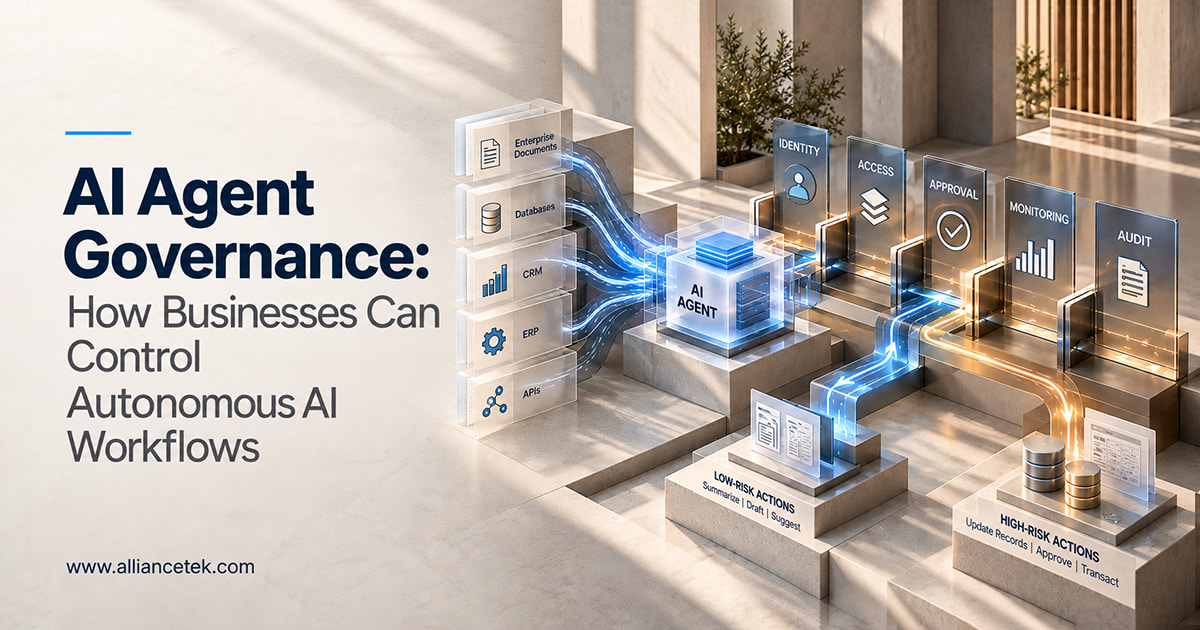
An agent that updates a CRM record, emails the customer, and kicks off a follow-up workflow has made three decisions before anyone looks at it. That’s fine when it gets them right. AI agent governance is how you decide, before deployment, what an agent can access, what it can do, and who answers for it when something goes wrong.
At AllianceTek, we’ve seen teams move from pilot to production faster than their controls can keep up. This is what AI agent governance should include, and how one can establish AI agent governance without burying simple use cases in a process.
Why Agents Need Rules That Ordinary AI Tools Never Did
The majority of AI systems generate some kind of output that will require evaluation by a user, such as a summary, a draft, or a suggestion. An agent in an agentic AI system is capable of updating the record, sending an email, launching a workflow, retrieving enterprise information, and initiating transactions on its own. According to Microsoft, there should be one governance and security baseline in place for this.
1. Shadow Agents Show Up First
One agent is manageable. Ten agents across HR, finance, support, and sales are a different problem, especially when a department built some of them on its own. These untracked “shadow” agents create security, compliance, and cost risks, and nobody can say what they can reach.
2. Small Errors Repeat at Scale
For instance, think of a customer service agent who accesses customer database information, generates replies, maintains the CRM, and executes follow-up actions. This particular agent may be misconfigured to access too much information and act outside the defined scope, repeating the mistake every time it opens a new ticket. The problem with autonomous AI solutions is that even small mistakes get amplified; hence controls must come first.
Who Owns the Agent, and How Do You Know What It Did?
Two questions come before everything else: who is responsible for this agent, and how do we trace its actions?
1. A Named Owner for Every Agent
Every agent requires an owner, either technical or business, responsible for its intended purpose, structure, data access, security, performance, and eventual decommissioning. If there is no known owner, then the agent will never be repaired when it fails.
2. A Managed Identity for Every Agent
Treat the agent like a user or an application and give it its own identity. That shows which agent took an action and which permissions it used, and it ties the agent into your existing access and lifecycle controls. Microsoft recommends this approach. It’s far easier to build identity in during AI agent development than to retrofit it onto agents already in production.
What an Agent Can Read Is Only Half the Question
Reading data and acting on it carry different risks, so each needs its own rules.
1. Limit What Agents Can Read
The principle of least privilege works in this case as well. A person responsible for hiring may need information about employees’ policies, but there is no need for him or her to gain access to financial or customer databases. In case an agentic solution accesses CRM, ERP, and other document management software, it is necessary to limit access to information that is required for the work of that particular agent. This limitation will not prevent errors. However, it will reduce their impact on the organization.
2. Separate Low-Risk Actions From High-Risk Ones
Summarizing a document, drafting an email, or suggesting next steps is low risk. Updating customer records, approving transactions, or changing financial information is not. The controls should scale with the consequences.
3. Decide Where a Human Steps In
The agent may generate its own purchase order, but the individual must approve the transaction. The approval process is crucial in cases involving finance-related matters, legal considerations, personnel, customer data, compliance issues, and security modifications. The point isn’t to slow agentic AI down. It’s to set decision boundaries once, so people aren’t second-guessing every output.
Not Every Agent Deserves the Same Level of Oversight
Heavy review on every agent slows teams down, and light review on the wrong one is how incidents happen. Microsoft’s current guidance describes three broad risk levels, and treating them differently keeps governance from becoming a bottleneck.
1. Low-Risk Agents
A document summarizer is the typical example. Basic monitoring and a named owner are enough.
2. Medium-Risk Agents
An internal HR knowledge agent falls here. It needs expert validation of its answers and a release review before it reaches employees.
3. High-Risk Agents
A customer-facing transaction agent belongs in this tier. Expect a security review, human decision controls, and an incident response plan before launch.
Placing an agent in a tier usually comes down to autonomy, data access, and business impact, and teams new to this often disagree. Agentic AI development services can help you settle on classification criteria before you have thirty agents to sort.
Once an Agent Is Live, Someone Has to Watch It
An agent nobody is watching is a liability, and agents carry security risks that ordinary applications don’t.
1. Watch What Agents Do
Track activity, workflow execution, data access, tool usage, errors, policy violations, and permission changes. That gives you an audit trail for important actions and an early signal when behavior drifts.
2. Fold Agent Security Into Your Existing Program
Agents face prompt manipulation, credential theft, data poisoning, excessive permissions, and unsafe tool use. Handle these inside your existing cybersecurity program rather than as a separate track. NIST is developing guidance on agent identity, authorization, and evaluation, so it’s worth following as autonomous AI systems become more capable.
You Can’t Govern Agents You Can’t Find
An inventory tells you what exists today. Lifecycle rules keep that picture accurate as agents change.
1. Keep a Simple Inventory
Record each agent’s name, business purpose, owner, platform, data sources, connected applications, permissions, risk level, deployment status, and last review date. A shared spreadsheet is enough to start.
2. Reassess When Things Change
An internal assistant that drafts emails is low risk. Permit it to execute actions in your billing system, and it needs a different review. Revisit an agent whenever its capabilities, data sources, permissions, or purpose change.
3. Retire What Nobody Uses
Retirement is the step teams skip most often, and it’s how old agents keep their access long after anyone remembers building them.
Where to Begin Without Building a Full Framework First
You don’t need every control in place on day one. The order matters more than the completeness.
1. Build the Foundation First
List every existing and planned agent, assign an owner to each, and classify each by risk. Those three steps show you where the real exposure is.
2. Then Add Controls in Order
Apply least-privilege access, set approval requirements for high-impact actions, turn on monitoring, and set review and retirement rules. If you’re building new agents, our Agentic AI development services can put these controls into the design from the first sprint, so governance ships with the agent instead of following it.
What to Do Before Your Next Agent Goes Live
Start by listing every agent running in your business today, including the ones a department set up on its own. It’s the cheapest step you can take this week, and most teams find agents they didn’t know about. That list shows where your biggest gaps are and which agents need an owner, a risk tier, or a review first.
After that, ensure your control process is balanced: light controls for summarizers, and stronger controls for activities related to finance and customer information. In this manner, governance allows agents to do more things with fewer surprises, while not having to wonder about who is responsible if they make a mistake.